This is not a picture. Tap the icons at the bottom: home, customers, recording a debt, the till and the profile all open inside this phone. Inside the till you can also tap the three sections at the top.
Home — today’s takings, net profit and the week’s bars
Till — sales, goods intake and receipt history
Customers and debt entry — who owes what
Profile — balance, language, printer and the evening report
Tap the screen
9:41
Asosiy
Bugungi savdo
842 000 so‘m
Sof foyda
210 ming
Sotuv
37
Qarzga
120 ming
Qarzdorlar
1,2 mln
Qarzim
380 ming
Sof balans
820 ming
Eslatma
Postavshik
Hisobot
Xarajatlar
Ombor
AI yordamchi
Kassa
Coca-Cola 1.5L
qoldiq: 23 dona
14 000 so‘m
Non
qoldiq: 40 dona
4 000 so‘m
Choy Ahmad 100g
qoldiq: 12 dona
22 000 so‘m
Savat 1 · 3 xil
Jami40 000 so‘m
NaqdKartaQarzga
Sotuvni yakunlash
Mahsulot nomi
Coca-Cola 1.5L
Shtrix-kodixtiyoriy
4780000123456
Qancha keldi (dona)
24
Kirim narxi (1 dona)
11 000
Sotuv narxi (1 dona)
14 000
Kirimni saqlash
Coca-Cola 1.5L ×2, Non ×1
15.08 19:12 · Naqd
32 000 so‘m
Choy Ahmad 100g ×1
15.08 18:40 · Karta · Aziz aka
22 000 so‘m
Shakar 1 kg ×3
15.08 17:05 · Qarzga · Dilnoza opa
36 000 so‘m
Ombor
Coca-Cola 1.5L
14 000 so‘m
23 dona
Non
4 000 so‘m
40 dona
Choy Ahmad 100g
22 000 so‘m
12 dona
Guruch Lazer 1 kg
18 000 so‘m
31 dona
Paxta yog‘i 1 l
24 000 so‘m
17 dona
Makaron 400g
9 500 so‘m
54 dona
Shakar 1 kg
12 000 so‘m
3 dona
Guruch Lazer 1 kg
18 000 so‘m
4 dona
Sut 1 l
Srok: 2 kun qoldi
9 dona
Tvorog 250g
Srok: 5 kun qoldi
6 dona
AI yordamchi
Bugungi savdo va foyda qancha?
Telegramga yubor
Kim qarzdor va kim kechiktiryapti?
Nima tugayapti, nima buyurtma qilay?
Telegramga yubor
Savdoni hisoblayapman...
Kim qarzdor?Nima buyurtma qilay?Qaysi tovar yotib qolgan?
Savolingizni yozing...
Mijozlar
Aziz aka
+998 90 123 45 67
420 000 so‘m
Dilnoza opa
+998 93 555 12 34
85 000 so‘m
Bek aka
telefon kiritilmagan
150 000 so‘m
Nodira opa
+998 91 777 08 22
0 so‘m
Sardor aka
+998 94 210 33 15
260 000 so‘m
Malika opa
+998 99 604 77 41
45 000 so‘m
Qarz yozish
Bosing va gapiring
Masalan: “Karim akaga 120 ming so‘m, shanbagacha”
0so‘m
Mijoz ismi
Karim aka
Qarzdor telefoni
+998 90 123 45 67
Muddatixtiyoriy
kk.oo.yyyy
Izohixtiyoriy
Qarz yozish
Profil
Balans150 000 so‘m · 12 kun
Do‘kon ma’lumotlari
TilO‘zbekcha (lotin)
Karta raqami•••• 9012
Skaner ovoziKod o‘qilganda “bip” chiqadi.
Chek printeri80 mm
Yorliq printeri40×30 mm
Kechki hisobot22:00
Xodimlar (sotuvchilar)
Recently added
Apps for Android and Windows: they work offline for up to 7 days and update themselves — download.
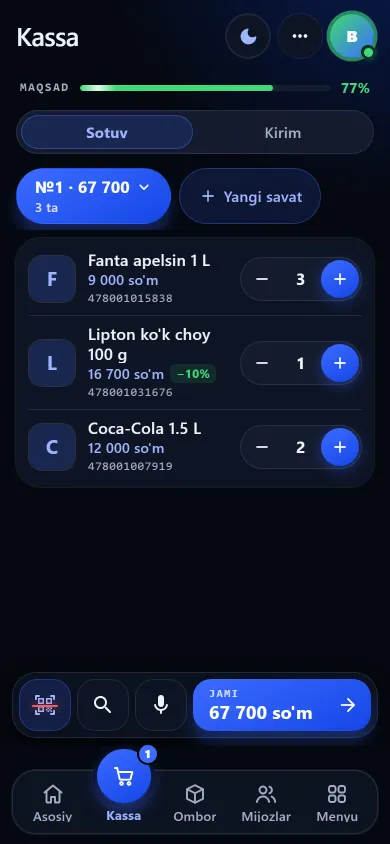
A new design with light and dark themes; animations can be switched off. The old design is still there under Settings → Design.
POS terminal mode on wide screens: on a tablet or computer in landscape the till opens as a dedicated terminal.
A setting to make a barcode mandatory on intake; the stock screen reminds you about products with no barcode.
EAN-13 and Code128 barcodes on labels are drawn to the printer’s dots, so they print crisply and scan easily.
The five above are the most used. The app has more, and all of them are open at the same price, with nothing extra to pay.
Customers
Who owes what, largest first. Each customer’s payment habit is shown by colour, and you can set a credit limit or block credit entirely — the backbone of the customer credit book.
Recording a debt
Dictate it or type it. From the Uzbek phrase “2 million 300 ming, shanbagacha” (2.3 million, by Saturday) the app pulls out the amount and the date; you just confirm. Russian phrases give the amount, and the date is picked in its field.
Write down the cash at the start, count it at the end — the app works out what should be there, shows any shortfall or surplus at once and records who closed the shift. That is where staff oversight begins.
Reminders
The system watches due and overdue debts every hour and prepares who to tell what. No SMS service is connected yet — the list is ready; the call is yours to make. How to collect debts.
Home screen
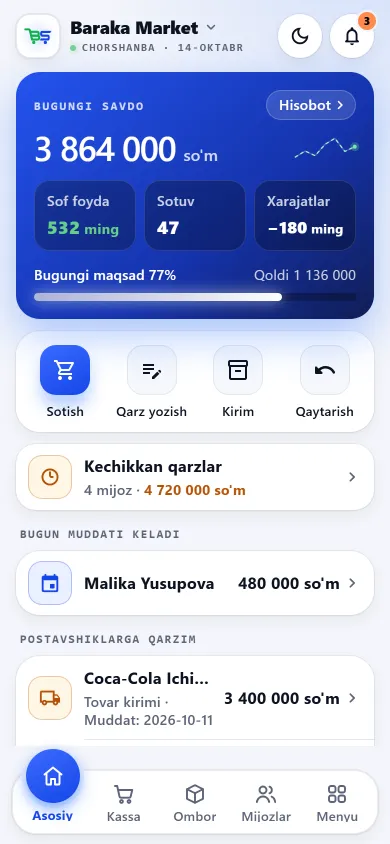
The moment you open it: today’s takings, net profit, the week’s bars, who owes you, what is running out and what is nearing expiry — all on one screen.
Sales history
Every receipt is kept: which items, how many, how they were paid. Reprint it, send it to the customer’s Telegram, or start a return right from it.
The central catalogue holds more than 1,700 verified products with factory barcodes: pick one and the name, unit, section and code fill the intake form. Or just scan the code on the pack — if the product is in the catalogue, the name and section fill in and you add the price and quantity.
The service is charged daily. This is where you see how much is on the balance and how many days it will last — and where you top up: on the Rahmat payment page with an Uzcard or Humo card, credited automatically.
Staff
Give a seller a PIN and decide yourself what they may do. Cost price, profit and debt figures are never even sent from the server to staff without the right — see what each permission opens.
The app runs in Uzbek (Latin), Uzbek (Cyrillic) and Russian. Shop name and type, receipt and label printers and the evening report hour are all set here.
What the app looks like inside
These are not illustrations — they are screenshots of the app itself. This is exactly how it looks on a phone.
New design
Previous design
Home screenToday’s takings, net profit, the week’s bars and the daily goal. Below: debtors, what you owe and the net balance.
New design
Previous design
The tillSales, goods intake and receipt history, with the expected cash shown on top.
New design
Previous design
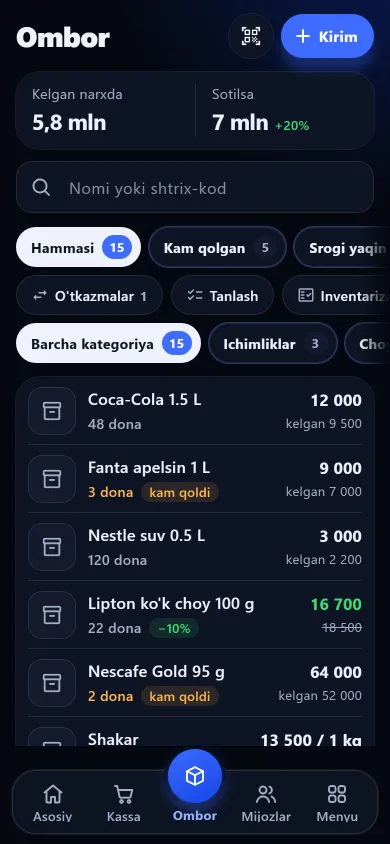
StockHow many lines, at cost and at sale price, with low-stock and near-expiry as separate tabs.
New design
Previous design
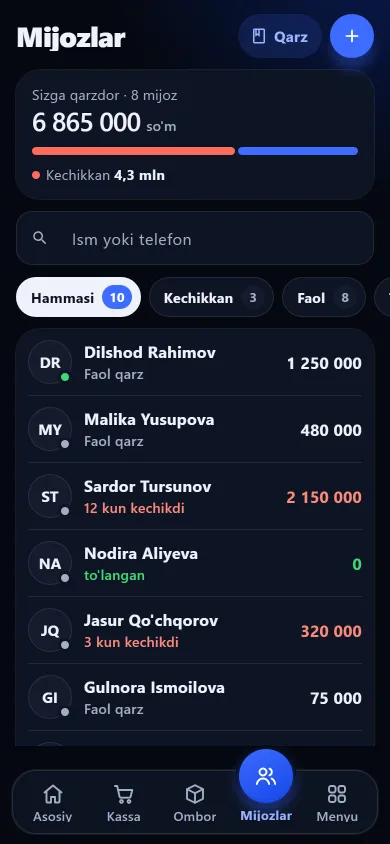
CustomersDebtors largest first, each with a dot showing their payment habit.
New design
Previous design
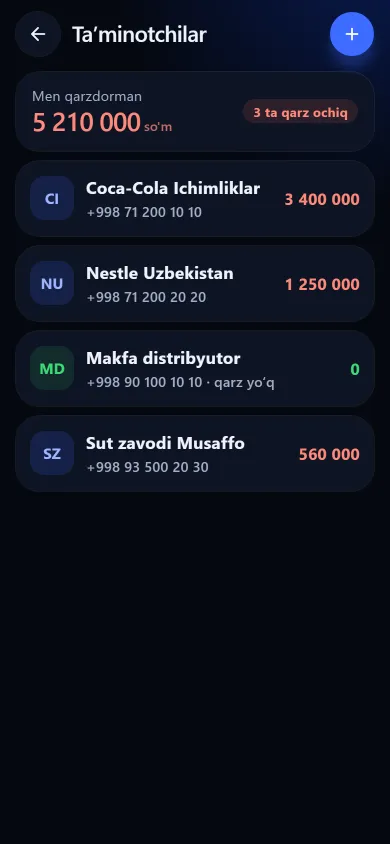
SuppliersWho you owe and how much, largest first, with the total on top.
New design
Previous design
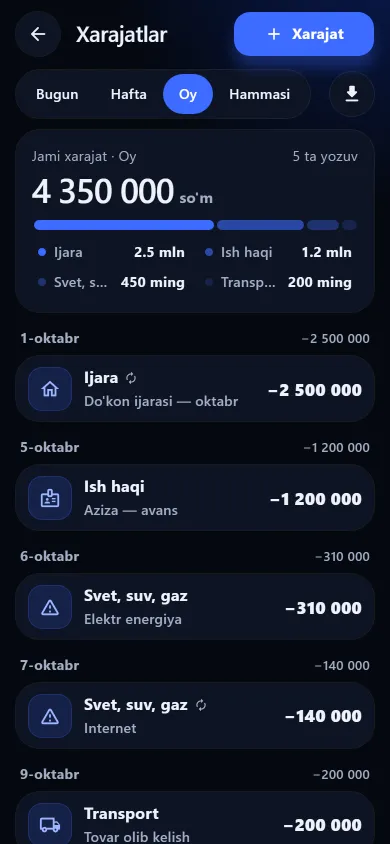
ExpensesThe share and percentage per category, with a day-by-day list below.
These screenshots come from a demo shop: the products, customers and amounts in them are invented. A real shop’s screen shows customer names and their debts, so we do not publish those. The screens themselves look exactly like this.
Included in every plan
There are no paid add-ons — everything below is available whatever your shop type.
Phone POS, barcode scanning and receipts
Inventory, intake and stocktaking
Customer credit ledger: debtors, due dates and a reminder list
 New design
 Previous design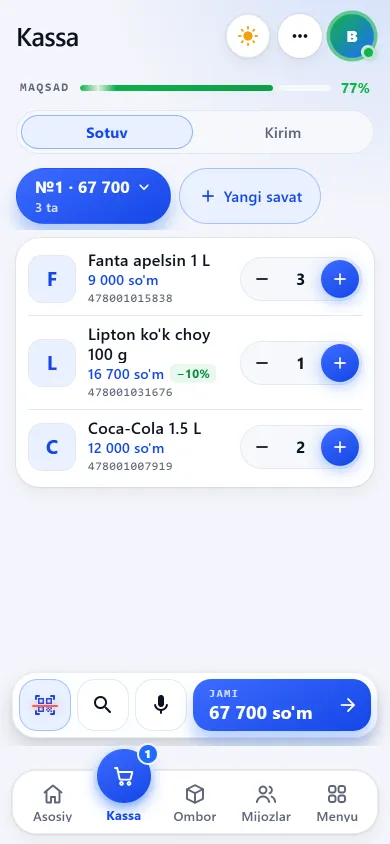
 New design
 Previous design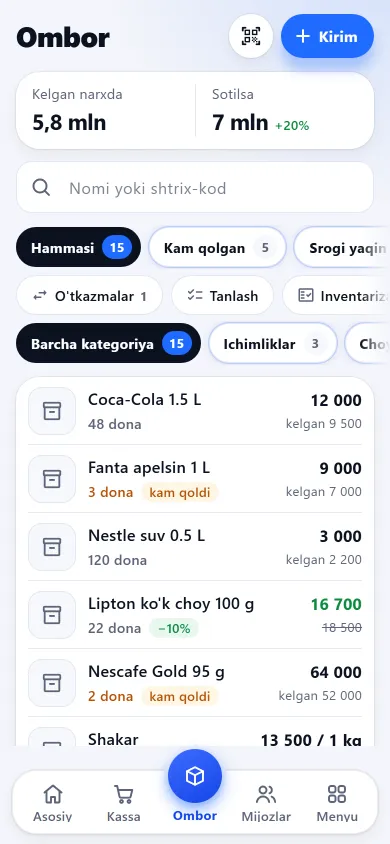
 New design
 Previous design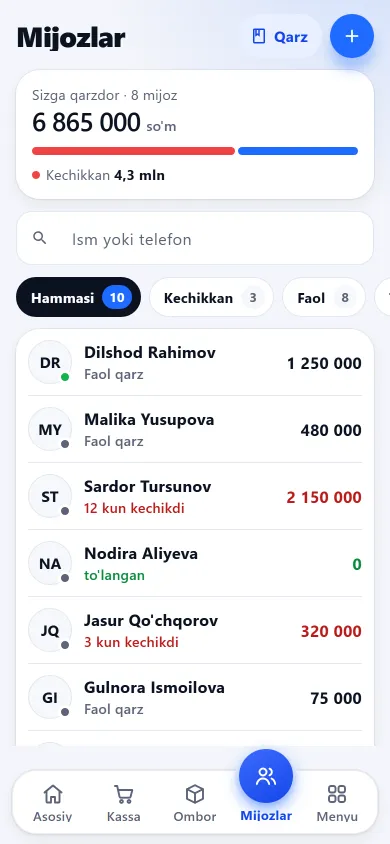
 New design
 Previous design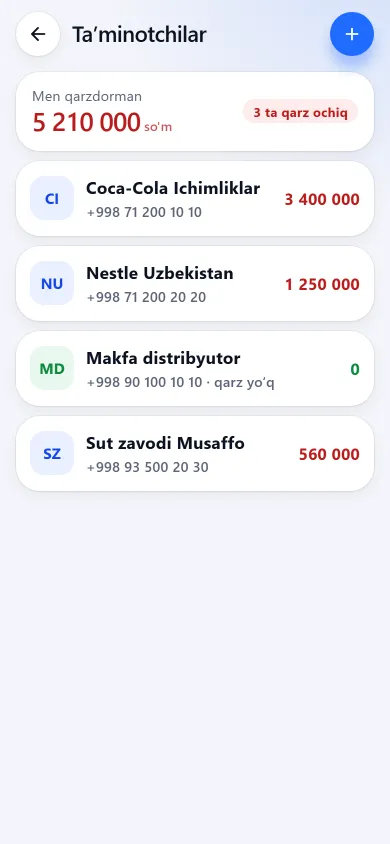
 New design
 Previous design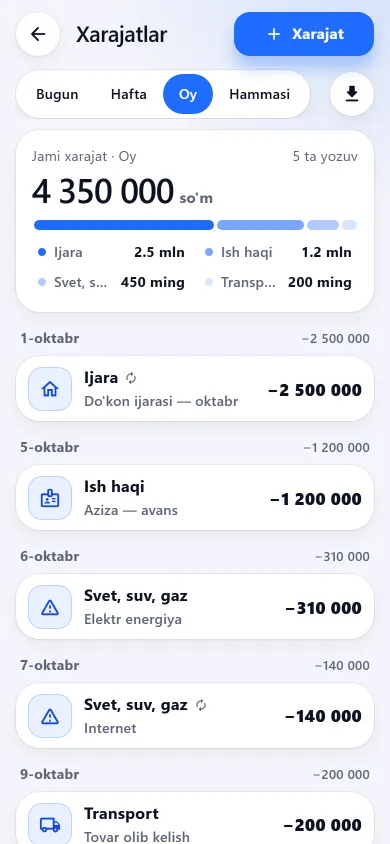
 New design
 Previous design