“Is the cashier skimming?”, “is stock walking out of the shop?” — questions like these deserve a number, not a hunch. BuySale is not a camera: it records every sale, every return and the cash in the drawer, and gives a seller only the permissions you grant.
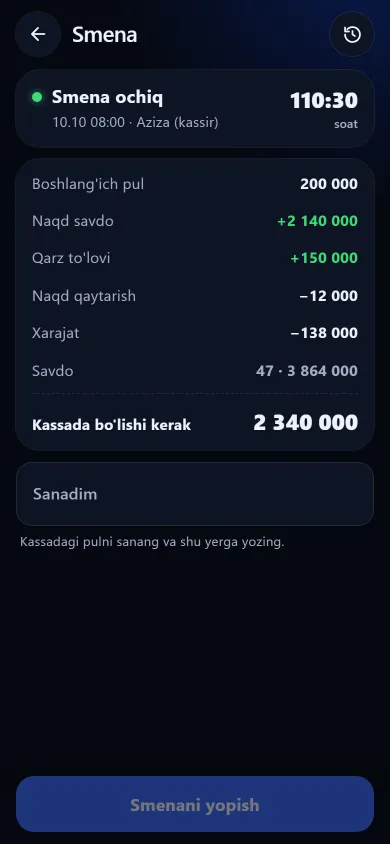
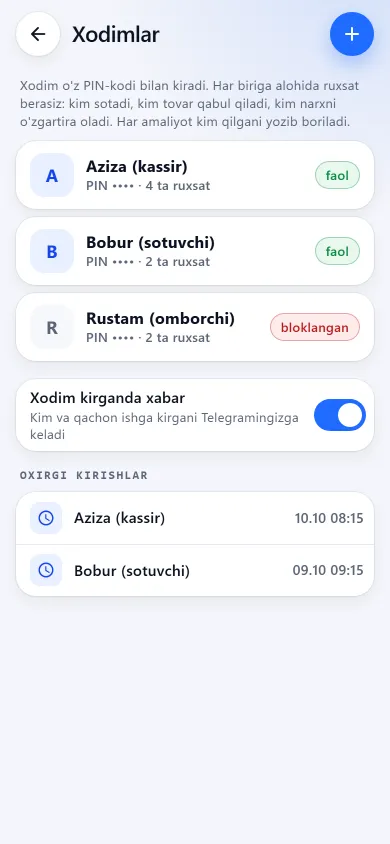
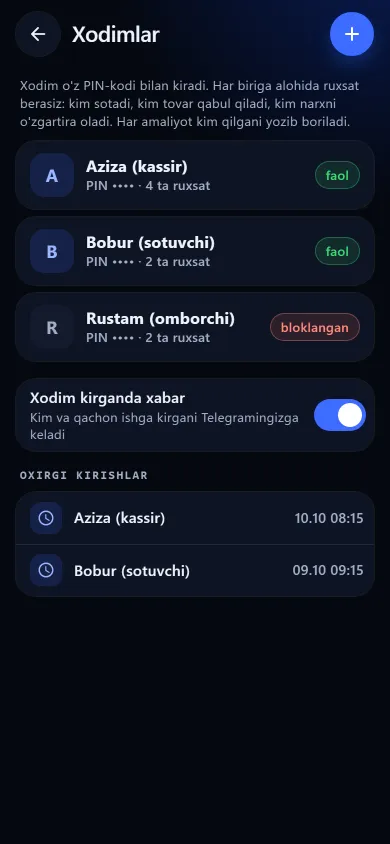
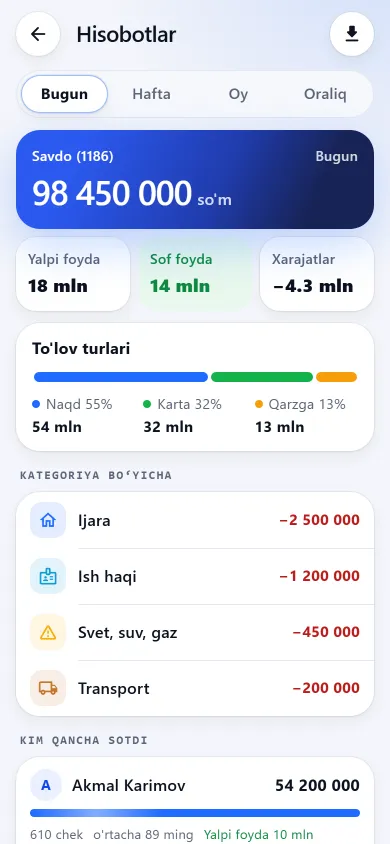
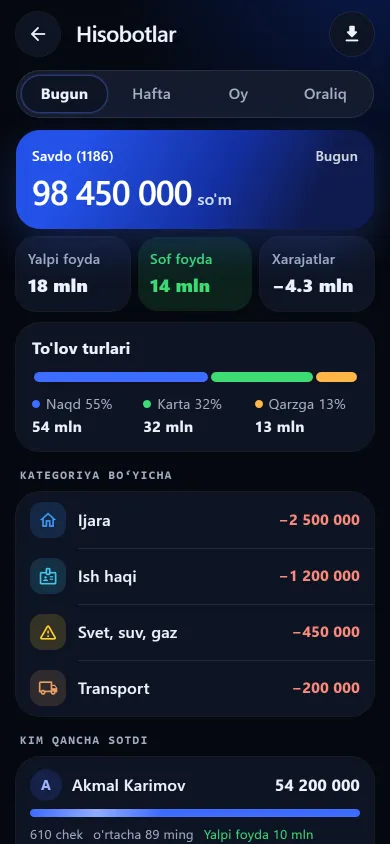
The shift reckoning, the staff list and “who sold what” — this is how they look on a phone.

New design
Previous design
New design
Previous design
New design
Previous designThese screenshots come from a demo shop: the products, customers and amounts in them are invented. A real shop’s screen shows customer names and their debts, so we do not publish those. The screens themselves look exactly like this.
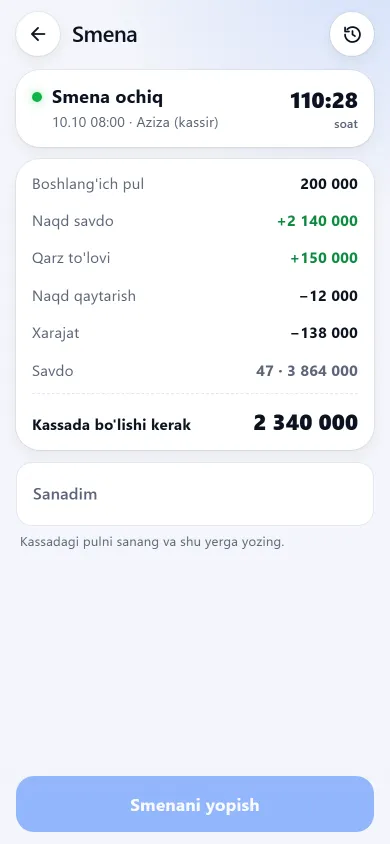
A shift is the simplest reckoning between you and your seller: what was in the drawer at the start, what should be there at the end, and what actually is. A cash shortage shows up right here, and who sold how much is in the report.
At the start of the day they enter the cash already in the drawer. The shift opens from the bar at the top of the sales screen — no separate menu to hunt for.
That same bar shows how much should be in the drawer right now: every cash sale, debt repayment, cash refund and expense moves the figure.
The seller enters the counted amount and the app shows the difference immediately; when there is one, a field opens for the reason.
The closed-shift list keeps who closed it, how many sales there were, the counted cash and the difference with its note. The list is visible to whoever holds the reports permission.
+
+
+
−
−
=
Every line is shown separately, so you can see where the number came from. One caveat: debt repayments and expenses are both treated as cash — an expense paid by card will show up as a difference at close.
Every record is stored with the account that entered it, so the end-of-month “but I sold more” argument simply goes away. Monthly targets and bonuses are worked out on the staff KPI screen.
Control is not only checking; it is also narrowing what is possible. Every permission is its own checkbox, plus ready-made sets: cashier, seller, senior seller and manager. A permission is not merely hidden on screen — the server checks it too.
Without that permission, cost and profit are never sent to the employee at all — not on the product card, not in the exported Excel file.
Touching prices is a separate permission. Haggling at the till (typing an agreed lower total) has its own permission too: no ready-made set except “Manager” includes it, and every discount given is recorded with the sale — see the permission list.
An employee without the reports permission sees no revenue, profit, expenses or closed-shift history.
Two separate permissions. Without them an employee sells only for cash and card and cannot process a return.
The staff list, PIN codes, balance and referral code are closed to employees under any permission set. And revoking a permission takes effect on their very next tap.
You cannot add more to the basket than the shop has in stock. Where the setting allows it, the app asks “sell anyway?” first.
The part most software keeps quiet about. Control has limits, and you are better off knowing them up front.
BuySale does not watch your seller — it records only what is entered into the app. No software sees a sale that never reached the till, which is why shifts and stocktakes matter.
Learn more →Each record keeps its author, but there is no “who changed the price, who deleted the item” history screen; the name behind an expense is not shown on screen either.
An employee’s 4-digit PIN is visible in plain view on the owner’s screen — it is a convenient way to separate work, not a signature. Repeated wrong PINs block sign-in for a while and alert the owner on Telegram.
With no shift open, sales, returns and expenses are still recorded — they just are not tied to a shift. A shift never closes itself, and a shop can have only one open at a time, so there is no per-till accounting.
It never declares “this is theft” — it works out what should be in the drawer: opening cash + cash sales + debt repayments − cash refunds − expenses. The seller enters what they counted, the difference appears at once, a reason is asked for, and it all stays in the shift history — so you can see on which days and with whom a shortage keeps repeating.
No software sees a sale that never reached the till. But the goods still leave the shelf while the records say otherwise, so a stocktake brings the gap to light. And wiping a stocktake to start over needs a confirmation code sent to the owner’s Telegram — an employee cannot do it alone.
Without the “see cost price” permission, cost and profit are never sent from the server — not on screen, not in the exported Excel file. Changing prices and haggling at the till are separate permissions again: until you grant them, a seller cannot lower a price.
Returns are a separate permission you can simply withhold. Where it is granted, every return is recorded: which item, from which sale, how much money went out and that the goods went back into stock. The amount is deducted from that seller’s own sales in the report, and a cash refund leaves the shift drawer as an outgoing.
No. A shop can have only one open shift at a time, so there is no separate accounting for two tills. Working in turns, each seller opens and closes their own shift — and who sold how much is still shown separately in the report.
Give your seller a PIN and tick each permission: cost price and reports stay hidden. You still see who sold what, shifts and any cash difference.
Learn more →What theft looks like in a small shop’s numbers, what to do in the first week, and which remedies need no software at all.
Learn more →Daily profit tracking: revenue, net profit, expenses and who sold what — today, last 7 or 30 days. Nightly Telegram summary if connected. 7 days free.
Learn more →Shop accounting via Telegram: the bot sends you sign-in codes, the nightly profit report and staff sign-in alerts; customers see their debt. Not a web shop.
Learn more →
7 days free, no payment card needed. Then from 6 630 UZS a day, depending on the shop type.
Start for freeBuySale assistant
Answers from what is published on this site
AI can make mistakes — check anything important via Telegram.
Writing an answer