Branches: several shops, one account, one balance

Opening a second shop no longer means a second sign-up: a branch is opened inside the app, from the main shop’s cabinet. Each branch runs like its own shop with its own goods, till and staff, the money comes off one balance, and you move between shops in one tap.

Try 7 days freeNo payment card needed

The short answer

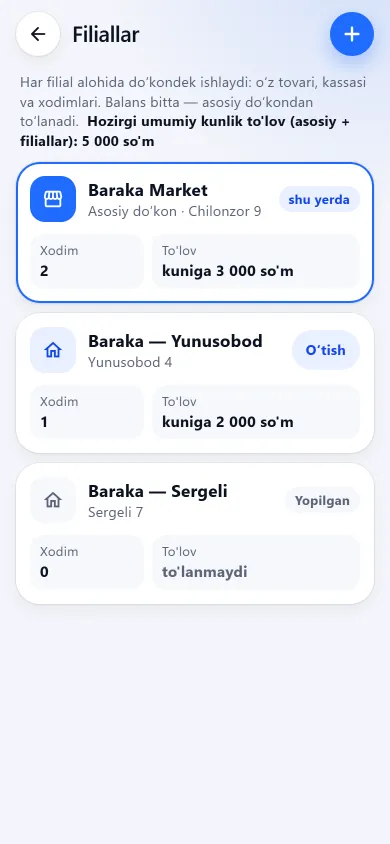
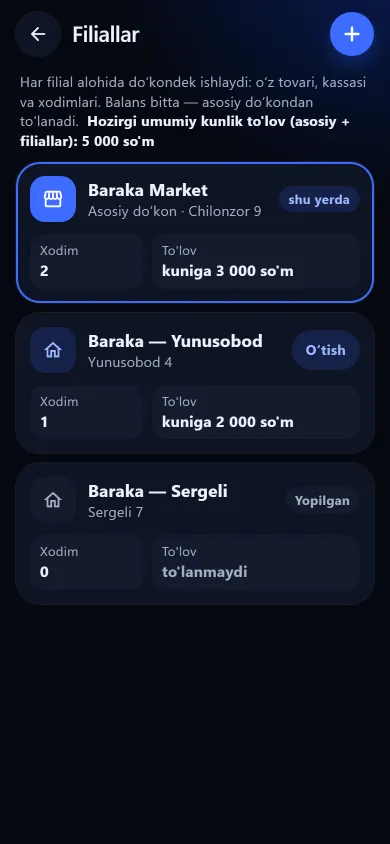
The Branches screen in the BuySale app listing the main shop and its branchesThe Branches screen in the BuySale app listing the main shop and its branchesNew design
The Branches screen in the BuySale app listing the main shop and its branchesPrevious design
BranchesThe main shop and its branches, each with its address, staff count and daily price. At the bottom: “Add branch”.
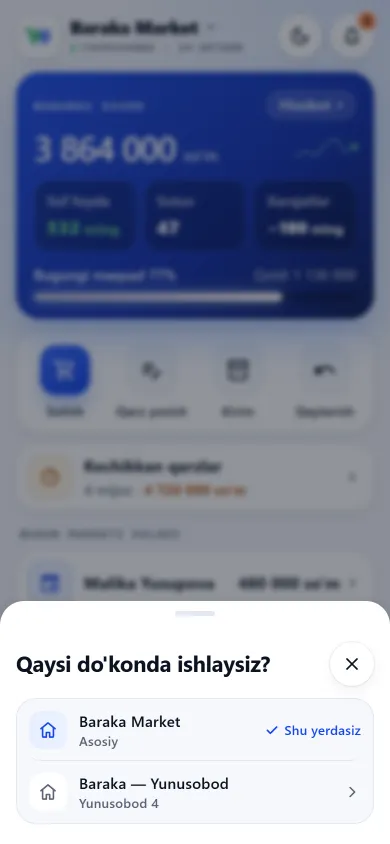
The branch switcher sheet listing the shopsThe branch switcher sheet listing the shopsNew design
The branch switcher sheet listing the shopsPrevious design
Switching shops“Which shop are you working in?” — the owner moves to another branch in one tap, without signing in again.

These screenshots come from a demo shop: the products, staff and amounts in them are invented. The screens themselves look exactly like this.

How to open a branch

Only the shop owner opens a branch, from their own cabinet. It takes a few minutes.

01

Profile → Branches

The list shows the main shop and the branches with each one’s address, staff count and daily price. The section is in the menu too.

02

Add branch

Type a name (for example “Chilonzor branch”) and, if you like, an address. The app shows the branch’s daily fee right there, before you confirm.

03

Open the branch

The branch starts with the main shop’s settings: shop type, language, receipt and label sizes. Its stock is empty — transfer goods from the main shop or enter them as goods-in.

04

Switch to the shop

Switch into the branch, add its staff and start trading. While you are in a branch, a “Branch: …” line sits at the top of the screen, so you always know where you are.

Money: one balance, a daily price per branch

Each open branch adds 6 630 UZS a day (198 900 UZS per 30 days). The money comes off the main shop’s balance, starting the day after the branch is opened; trial and gift days are not charged. A closed branch costs nothing from the next day. If you reopen a closed branch, that day’s branch fee may be taken at once — the app tells you before you reopen.

Who sees what and how they sign in

The owner

Sees every branch and switches between them in one tap: from the profile header, the left-hand menu on a computer, or “Switch” on the “Branch: …” line. No new code is asked for. If baskets are open, the app asks first — they will be cleared.

Staff

Works only in their own branch and cannot switch to another. Under “Sign in as staff” they enter the main shop’s number and their own PIN. PINs are unique across all branches; someone who works in two branches gets a separate staff entry and PIN in each.

Telegram

Messages go to the main shop’s owner: the evening report (main shop, each branch and the total), staff sign-ins with the branch name, and low-balance warnings based on the combined daily price. Voice debt entry and AI questions in the bot work with the main shop.

The evening report: every branch in one message

Every evening Telegram report starts with the main shop, then each branch on its own, and ends with the combined total (“Jami: asosiy + N filial” — the report is in Uzbek). It is sent according to the main shop’s setting — when switched on, at the chosen hour.

Notifications: every change in one list

There is a bell at the top of the app (and in the left-hand menu on a computer): it shows the unread count, and a tap opens a list grouped by day — amounts marked “+” or “−”, with the branch and the time. It works in a shop without branches too.

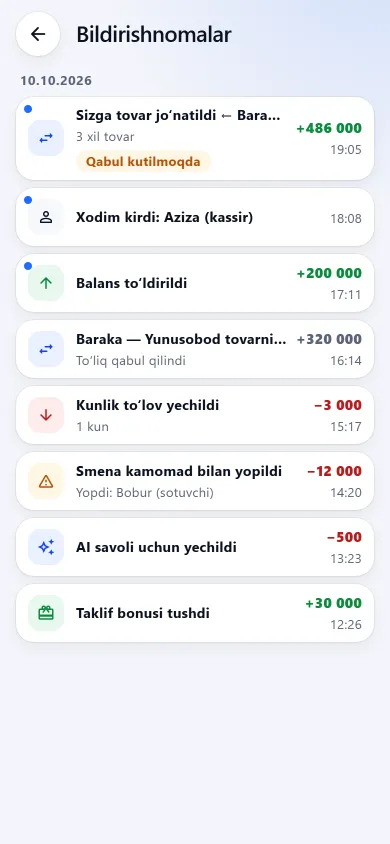
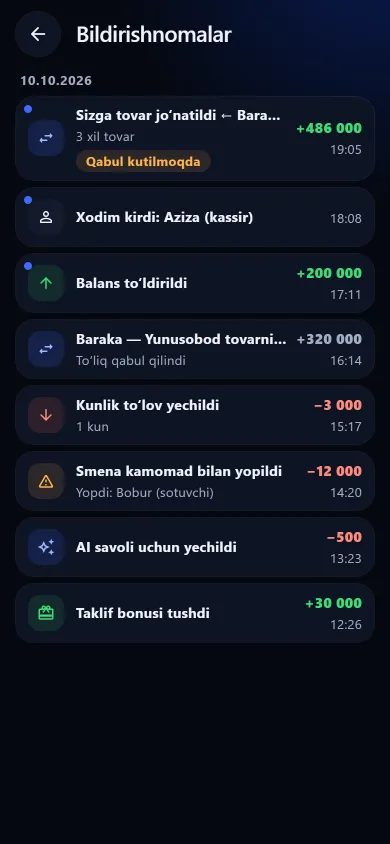
The in-app notification listThe in-app notification listNew design
The in-app notification listPrevious design
NotificationsBalance charges and top-ups, transfers, staff sign-ins and shifts with a difference — grouped by day.

These screenshots come from a demo shop: the products, staff and amounts in them are invented. The screens themselves look exactly like this.

Closing and reopening a branch

What this section does not do

We say it plainly up front, so there is no “but I thought it did that” later.

Questions about branches

Do I need to sign up again for a second shop?

No. A branch is opened from the main shop’s cabinet, with no separate phone number or Telegram account. A shop that was registered separately before cannot be attached as a branch, though — it stays on its own account.

What does a branch cost?

Each open branch adds 6 630 UZS a day (198 900 UZS per 30 days). The money comes off the main shop’s balance, starting the day after the branch is opened; trial and gift days are not charged. A closed branch costs nothing from the next day. If you reopen a closed branch, that day’s branch fee may be taken at once — the app tells you before you reopen.

How does an employee sign in to a branch?

They tap “Sign in as staff”, enter the main shop’s number and their own PIN, and the app opens their branch. That is why PINs are unique across all branches. If two employees ended up with the same PIN earlier, the owner changes one of them.

Where do I see the combined profit of all branches?

In the evening Telegram report: it shows the main shop, each branch and the total (sales, profit, expenses, credit) for the day. The in-app Reports are separate for each branch — there is no in-app report that adds all branches up by week or month.

Can prices differ between branches?

Yes. Each branch has its own product cards and selling prices. Goods that arrive by transfer as a new card take the sending shop’s selling price; added to an existing card, they leave its price unchanged.

Can a branch be a different type of shop?

Yes. A branch starts with the main shop’s type, and you can change it inside the branch under Profile → Shop — a pharmacy branch of a grocery, say. Fields such as expiry dates, sizes or IMEI follow the branch’s own type.

What happens when the balance runs out?

Everything stops together — the main shop and the branches. Stopped days are not charged and no data is deleted. Once the balance is topped up from the main shop’s cabinet, everything runs again. The negative balance rule applies to branches too.
Related pages

BuySale

Open your second shop today

7 days free, no payment card needed. Then from 6 630 UZS a day by shop type; branch pricing is on the pricing page.

Start for free