Selling on credit happens anyway — the hard part is remembering it. In BuySale the debt is written at the till: you type the phone number, a known customer comes up with their name and current balance, and the rest goes into the ledger by itself.
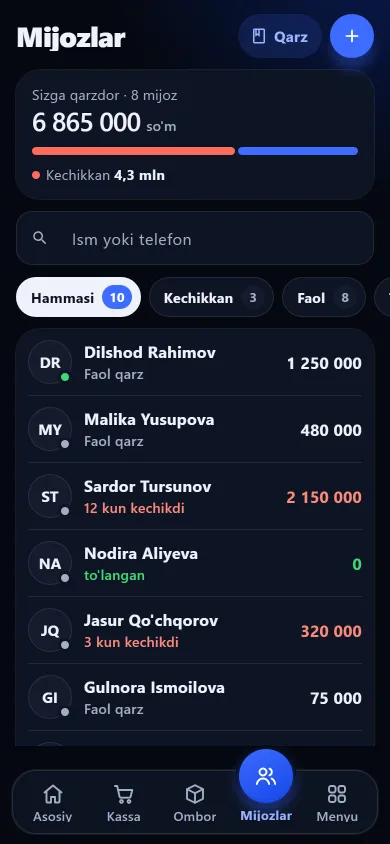
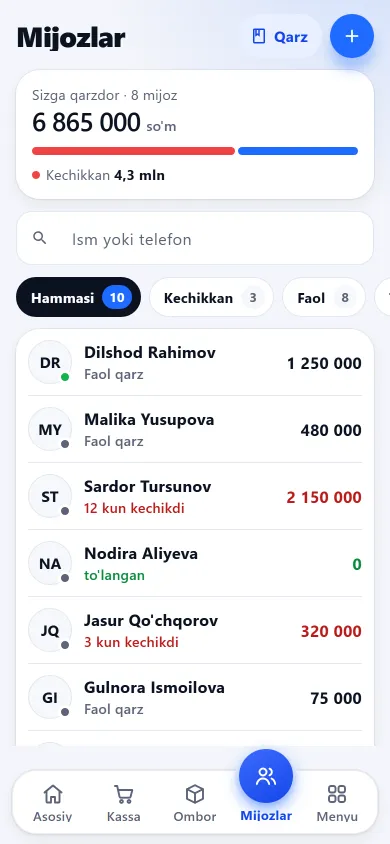
Each customer’s name, number and balance sit on one line. The icons below take you into the app’s other sections too.
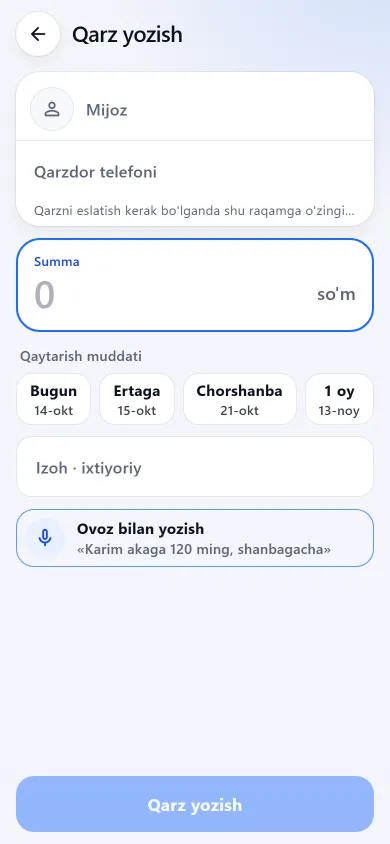
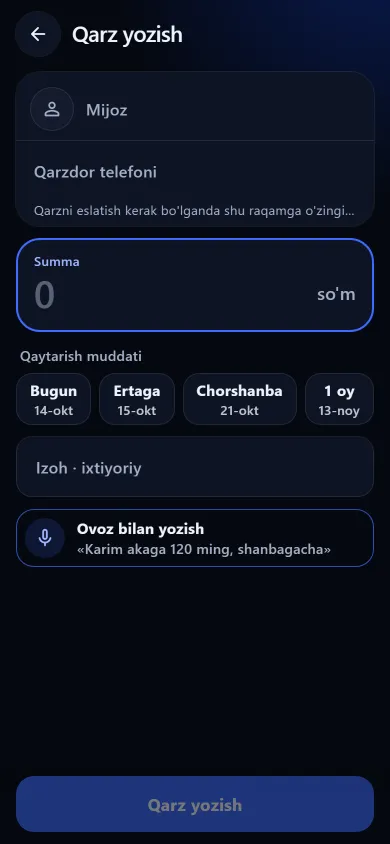
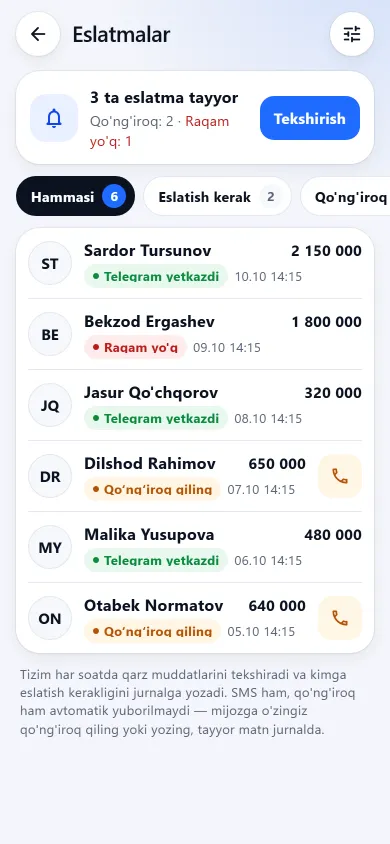
The customer list, recording a debt and reminders look like this on a phone.

New design
Previous design
New design
Previous design
New design
Previous designThese screenshots come from a demo shop: the products, customers and amounts in them are invented. A real shop’s screen shows customer names and their debts, so we do not publish those. The screens themselves look exactly like this.
You do not need a separate screen for credit — you build the basket at the till and choose “On credit” as the payment type. Selling on credit is a separate permission: if you do not grant it, that employee can only take cash and card.
Once the basket is ready you mark “On credit”. A single sale can also be split in two: part in cash or by card, the rest on credit.
As soon as the number is complete the database is searched: an existing customer appears with their name and open balance, and only a new one is asked for a name. No debt is recorded without a number.
In the “How much did the customer pay now” field you enter what you actually received — the rest is worked out for you. If the customer covered part of the purchase, only the remainder is booked as debt.
The moment the sale is finished the debt is written into that customer’s ledger and added to their total. In a split payment only the remaining part becomes debt.
Debts can also be written outside the till — when the customer took the goods yesterday, for instance. This is also where a due date is set.
You do not have to keep track in your head — the list is sorted by how much each customer owes. If you owe a supplier yourself, that is kept separately — see supplier debts.
Total balance, phone number and every debt in one place. Each one shows the amount, note, due date, how much is paid and its status: active, overdue or settled.
Debts past their date are marked automatically and appear as their own list on the home screen, alongside a “due today” list. The check runs by itself once an hour.
Each customer carries a coloured dot worked out from their real history: how many debts they closed on time, how many days late on average, and how long they are overdue right now. When you write a debt for a risky customer, a warning appears on screen.
You can set a ceiling of “no more credit beyond this” for a customer, or block them entirely — past the limit, or while blocked, no new debt is recorded. It applies both to debts written by hand and to credit sales at the till.
Here is the honest picture. The calculation side of reminders works — the software decides who needs reminding, when, and with what wording. Delivering the message is still down to you. How to collect without falling out is in the guide to managing credit. Ready reminder texts and rules for talking it through without a row are on the debt collection page.
A customer can be connected to your shop through Telegram, which cuts down the “I never took that much” arguments.
From the customer card you copy the link, share it through Telegram, or send it as an SMS to the customer’s number — that SMS goes through your own phone’s messaging app. You do not need to know their Telegram details.
The customer taps the link and the connection is done. The code in the link is signed, so nobody can change a number and look at someone else’s purchases. You can disconnect them whenever you need to.
On a credit sale the receipt reaches them by itself: the items, the total, how much of it went on credit and their overall balance. Two buttons in the bot open “My purchases” and “My debt” at any time. An ordinary cash or card sale does not ask for a customer, so no receipt is sent in that case.
No — that is your decision. Who may sell on credit, who may see debts at all, who may write a debt and who may take repayments are four separate permissions. An employee without the right never sees debt figures, the ledger or the payment-habit dot: they are not merely hidden, they are not sent from the server at all. More in the staff permissions guide.
No. The software works out who to remind, when and with what wording, builds the list and logs it — but neither an SMS service nor telephony is connected yet, so nothing arrives on the customer’s phone. Debt reminders do not go through Telegram either. The list is ready; the call is yours to make.
Not yet — worth knowing in advance. The amount, note or due date of a debt already written cannot be changed, and it cannot be deleted; the only actions are adding a repayment and writing a new debt. So check the figure before you confirm. A customer can only be deleted once they have no open debt left.
No. A debtor cannot be created without a phone number, and every number is stored in one consistent form — entries starting with “8” or written with spaces and dashes are understood too. The same number cannot belong to two customers: you are told whose it is. One thing to know: the search in the customer list works by name, while lookup by number works at the till when you sell on credit.
Yes. You split the sale in two: enter what you received and the rest is calculated and booked as debt. The server checks that the two parts add up to the sale total, so the till stays consistent. One limitation: if the basket contains a discounted item, a split sale like this is not saved yet.
Yes. The debtor list is sorted by amount owed, and the home screen shows overdue debts and those due today as separate lists. If the AI assistant is enabled for your shop you can simply ask it “who owes what” or “who is overdue” — it reads the ledger and answers.
In a shop they are one and the same: who took what on credit and when they will pay. The word “nasiya” is also used by instalment services — in BuySale it means the shop’s own credit book, not a bank loan. How this differs from apps that only record debts — see debt book apps compared.
Lose the notebook and the debts go with it. In BuySale debts live on the server, so after a phone change you sign in with the same number and see everything; an employee sees only what they are allowed to. How to move an old notebook over is on the moving-from-paper page.
How to run customer credit in a shop: selling on credit, the phone number, partial payments, checking a customer’s history and collecting money.
Learn more →Customer not paying? How to remind without a row, ready-to-send message texts and rules that keep credit small in the first place. Not legal advice.
Learn more →Debt book apps in Uzbekistan compared: which only record debts, which work with a till, who sends SMS and what they cost — with sources and dates.
Learn more →Daily profit tracking: revenue, net profit, expenses and who sold what — today, last 7 or 30 days. Nightly Telegram summary if connected. 7 days free.
Learn more →Give your seller a PIN and tick each permission: cost price and reports stay hidden. You still see who sold what, shifts and any cash difference.
Learn more →
7 days free, no payment card needed. Then from 6 630 UZS a day, depending on the shop type.
Start for freeBuySale assistant
Answers from what is published on this site
AI can make mistakes — check anything important via Telegram.
Writing an answer