Staff KPIs: who sold what, who hit the target, what bonus is due

No more leafing through a notebook at the end of the month to work out a seller’s bonus. The Staff KPIs screen shows each employee’s net sales, receipts, returns and shift shortages for the month, and the bonus is calculated from the monthly target and terms you set. Only the shop owner sees this screen.

Try 7 days freeNo payment card needed

The short answer

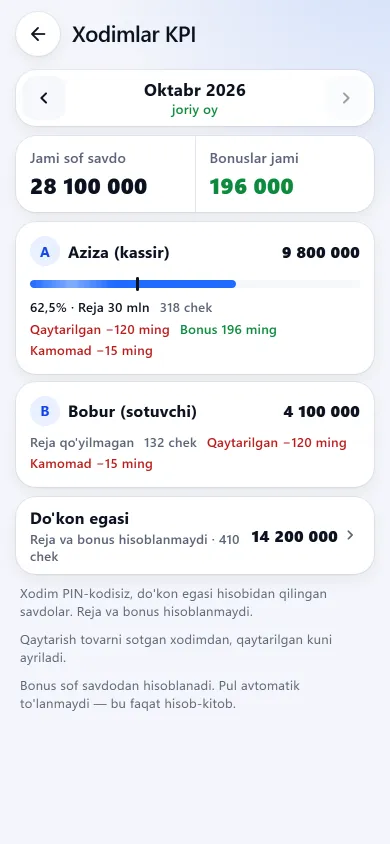
The staff KPI screen with sales, plan progress and bonusesThe staff KPI screen with sales, plan progress and bonusesNew design
The staff KPI screen with sales, plan progress and bonusesPrevious design
Staff KPIsFor the month: each employee’s net sales, plan progress and bonus, with totals at the top.
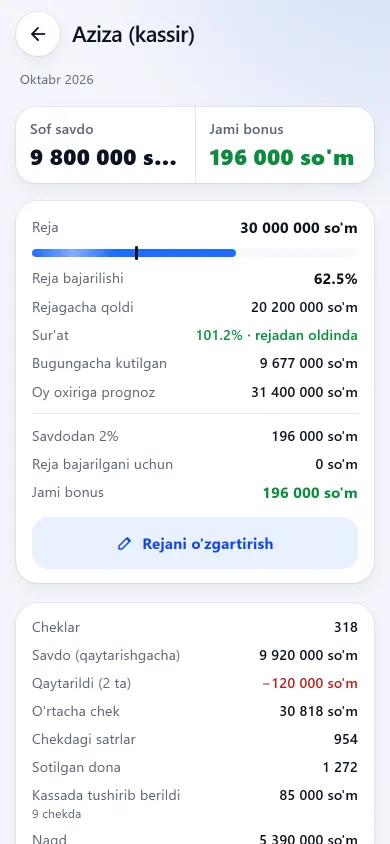
One employee’s KPI figures and monthly planOne employee’s KPI figures and monthly planNew design
One employee’s KPI figures and monthly planPrevious design
One employee and the planReceipts, average receipt, returns, shift shortages and pace; the plan and bonus terms are set here.
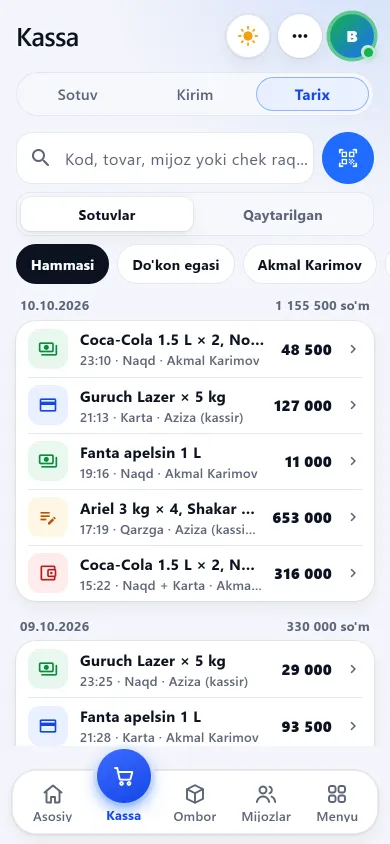
Sales history showing the seller on each receipt and a seller filterSales history showing the seller on each receipt and a seller filterNew design
Sales history showing the seller on each receipt and a seller filterPrevious design
Sales historyTill → History: every receipt shows who sold it, with a seller filter on top.
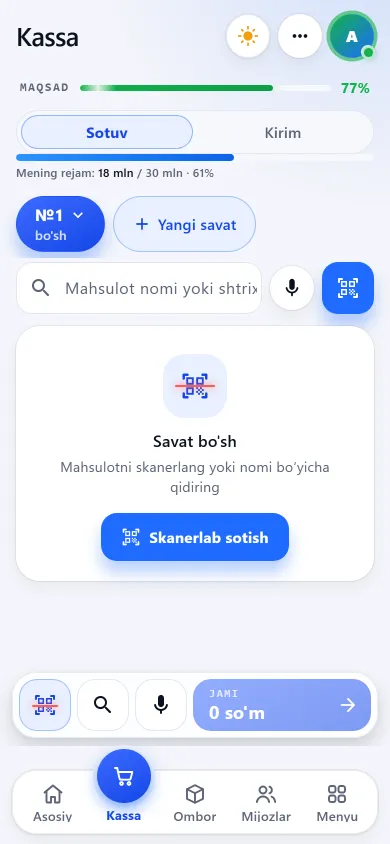
The “My plan” strip on the till screenThe “My plan” strip on the till screenNew design
The “My plan” strip on the till screenPrevious design
The seller’s plan“My plan” on the employee’s till: sales so far this month and how much of the plan is done.

These screenshots come from a demo shop: the products, staff and amounts in them are invented. The screens themselves look exactly like this.

What it measures

The figures are calculated the same way as in Reports: add up the employee rows for a month (owner’s row included) and you get the shop’s total sales.

Net sales

Sales minus returns. A return comes off the employee who SOLD the item, on the day of the return — even if someone else processed it.

Receipts

Receipt count and average receipt, lines and pieces sold, the payment split (cash, card, credit) and discounts given at the till.

Shifts

How many shifts they opened and closed. Shortfalls and surpluses go to the employee who OPENED the shift; shared shifts where others also sold are flagged.

Days worked

The number of days with a sale, a return, a shift or a PIN sign-in, and the last activity.

Gross profit (owner only)

Profit per employee. If some items have no cost price, the app warns that profit may look higher than it is. The bonus is based on net sales, not on profit.

The owner

Sales made under the owner’s own account, without a staff PIN, sit on a separate “Shop owner” row — with no target and no bonus.

How the target and bonus work

Each employee gets three values: a monthly target (net sales, UZS), a bonus percentage of sales and an extra bonus for hitting the target (UZS). Bonus = net sales × percentage, plus the extra bonus if the target is met.

For example: a target of 30,000,000 UZS, 1% of sales and +500,000 UZS for hitting the target. With 32,000,000 UZS of net sales in the month the bonus is 320,000 + 500,000 = 820,000 UZS; with 28,000,000 UZS it is 280,000 UZS and no extra bonus.

  • A target applies from the current month and carries forward. Only the current month’s target can be edited — past months and their bonuses never change.
  • It works without a target too: with only a percentage set, the card reads “No target: N% of sales”. The extra bonus can only be set together with a monthly target.
  • For the current month you see the pace: what was expected by today, whether the employee is ahead of or behind target, and a month-end forecast.
  • A bonus is never negative: if returns outweigh sales for the month, the bonus is 0.
  • Only the shop owner sets targets and bonus terms, and each employee’s target history is kept.

Who sold it, right in the sales history

What the employee sees

In branches

KPIs are worked out per branch, for that branch’s staff: to see their targets and bonuses, the owner switches into the branch. There is no combined KPI across all branches. How branches work is on the branches page.

What this section does not do

We say it plainly up front, so there is no “but I thought it did that” later.

Questions about staff KPIs

Can an employee see their own KPIs?

Not the KPI screen itself. If they have a monthly target, their till shows a “My plan” strip with net sales so far this month, the percentage of the target and, once it is met, the bonus. Other people’s targets and bonuses stay hidden.

Is the bonus added to wages automatically?

No. The app only calculates the bonus amount; nothing is paid out or posted to expenses. When you pay it, record it yourself as a wages expense so your net profit stays right.

Whose sales does a return come off?

From the employee who sold the item, on the day of the return. Even if someone else processed it, the money comes off the seller, and the person who processed it gets a “returns processed” count. Return last month’s sale this month and this month’s net sales go down; last month stays as it was.

What if I change the target mid-month?

The new target and terms apply to the current month at once and carry forward. Past months do not change. Switch the target off and no target or bonus is counted from this month on.

What if two sellers work the same shift?

Each sale is recorded under the account (PIN) that rang it up, so sales never mix. A shift shortfall or surplus goes to the employee who opened the shift, and the shift is flagged as shared — so you can judge it yourself.

How is this different from “who sold what” in Reports?

The numbers are calculated the same way, so for the same period they match. The KPI screen adds targets, bonuses, pace, shift shortages and days worked. The general reports are on the reports and profit page.

Related pages

BuySale

Set the target and let the bonus work itself out

7 days free, no payment card needed. Then from 6 630 UZS a day by shop type, with nothing extra per employee.

Start for free